Two years in valet operations
I worked valet for two years and saw the same problems every shift: lost tickets, unclear vehicle status, slow handoffs, and weak damage records. This case study turns those observations into a hypothetical workflow.
Existing tools felt designed around feature lists rather than rush-hour constraints. I focused on quick training, few taps, and a shared view of the lot.
The result is a proposed service system and interactive prototype grounded in the interruptions, poor connectivity, and handoffs that happen during a busy event.
Proposed system
A hypothetical shared workspace for tracking cars, shifts, photos, and team handoffs. The concept centers on one current view of the lot that every attendant can understand quickly.
The concept focuses on:
- A shared vehicle status model for parked, returned, and on-deck cars
- Clear handoffs between attendants working different parts of the lot
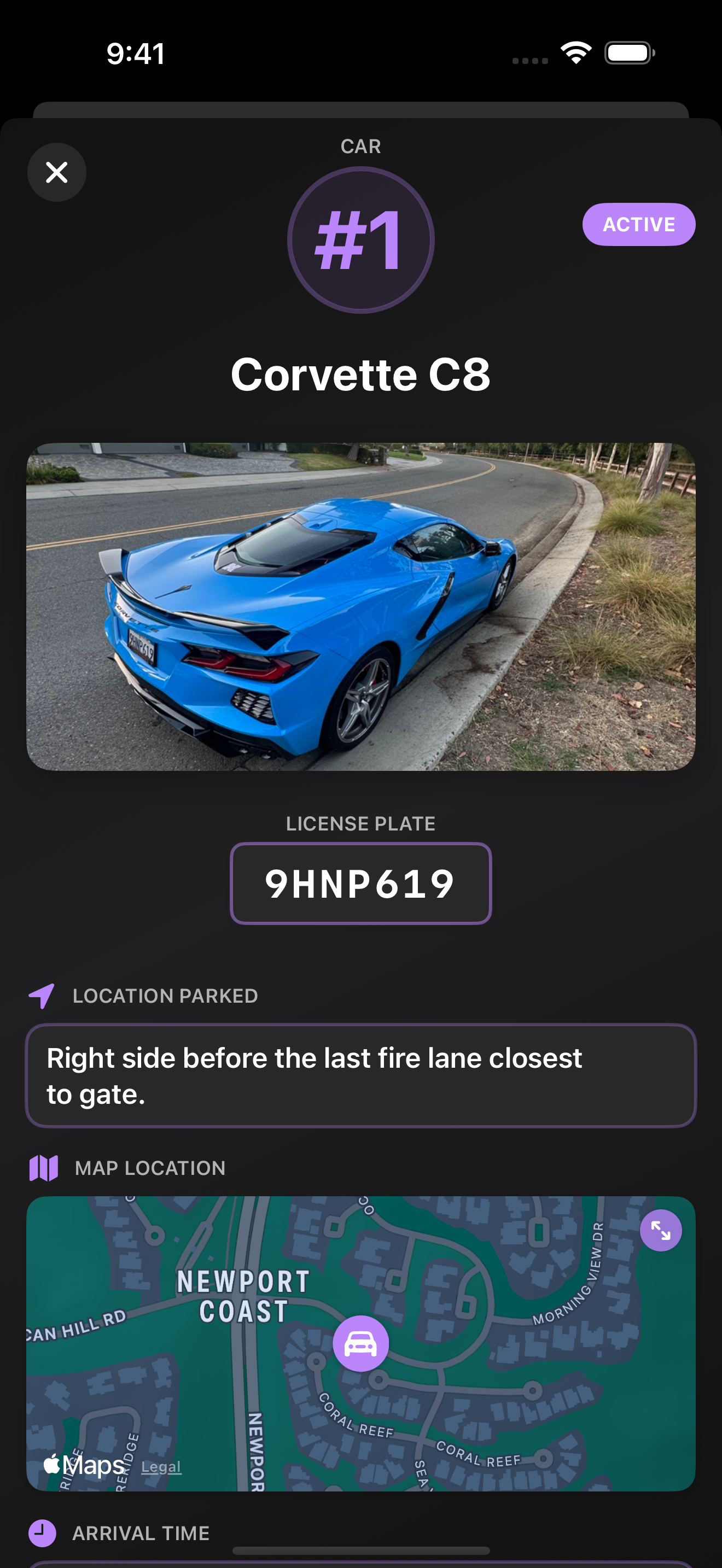
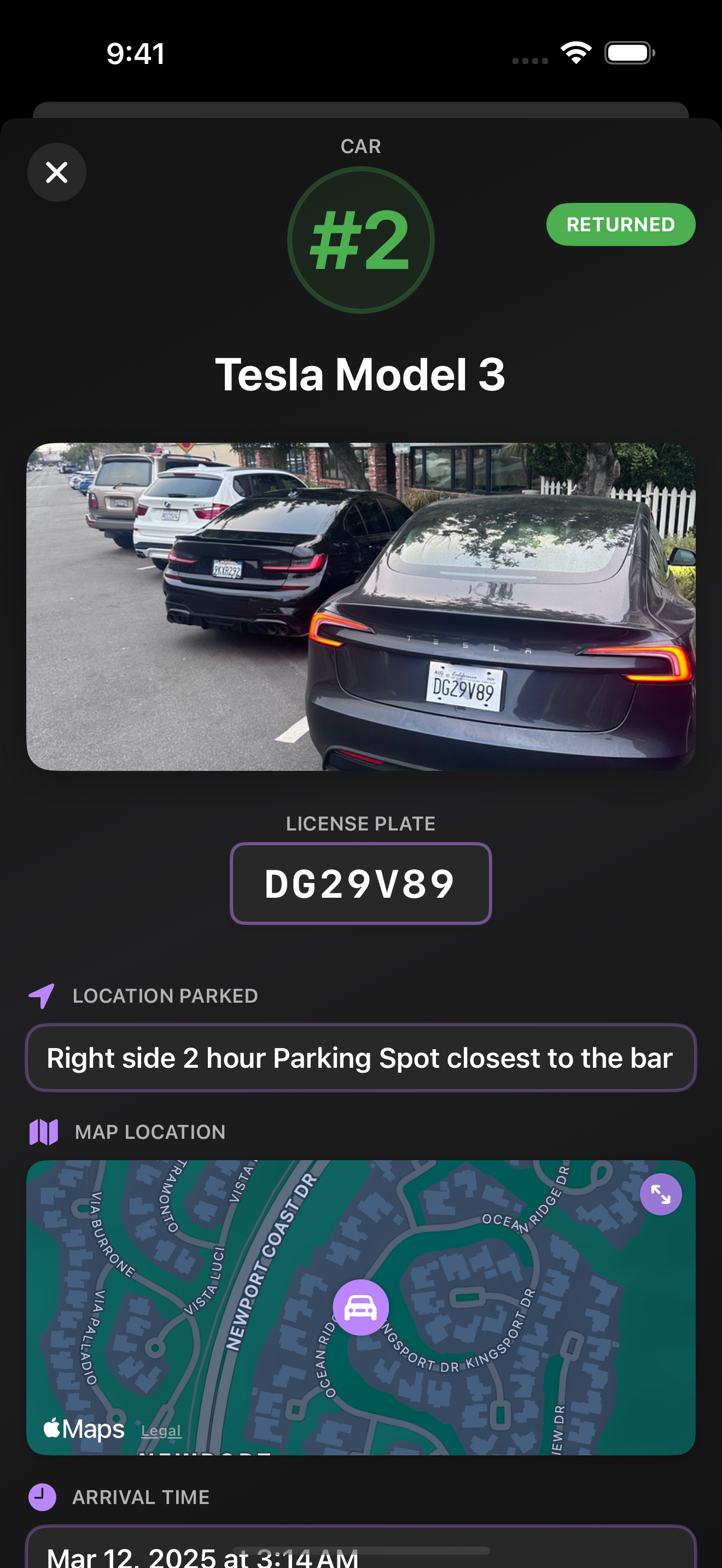
- Photo and condition records tied to each vehicle
- Shift coordination with little manual entry
- A traceable activity history for disputes and review
Problems I saw on shift
These problems caused real errors, slower service, frustrated guests, and extra stress for the team.
Information Chaos
Paper tickets got lost. Staff didn't know which cars had returned. Customers asked about their cars and nobody could find the information quickly. Each person on the team had a different mental model of who'd parked what.
Speed Friction
During a rush, you need to update vehicle status in seconds, not navigate through 5 screens. Every extra tap delayed other team members from knowing the current state. Complex workflows meant training took weeks.
Coordination Gaps
Team members worked different parts of the lot and didn't always know what others were doing. If someone parked a car, others might waste time looking for it. Miscommunication created gridlock and frustrated guests.
Documentation & Liability
Customers would claim we damaged their cars. Without structured records (photos, condition notes, who handled it), there was no way to defend ourselves. Everything relied on memory and trust.
Shift Management Overhead
Manually tracking who worked which shift, which cars they handled, and shift accounting took hours after each event. There was no automated way to tie accountability to outcomes.
Design principles
Rather than guessing what valet teams needed, I designed around what I'd actually observed working in the field.
Minimize Cognitive Load in High-Stress Environments
During a rush, attention is already split. The proposed interface uses visual status indicators, a scannable grid, and only the actions needed in that moment.
Design for the Real Workflow, Not the Imagined One
I based the flow on how attendants move through a lot, where interruptions happen, and which information is needed during each handoff.
Shared state is the foundation
Any version of the system would need to keep vehicle status consistent across the team, including when connectivity is unreliable.
Visual Feedback Over Text for Quick Scanning
Color, layout, and simple icons make vehicle status easy to scan without reading through a dense list.
Design decisions
Vehicle Tracking Grid
Solves: Information Chaos + Speed Friction
A clean grid showing every vehicle's status at a glance. No hunting through lists. Color-coded indicators show parked, returned, or on-deck status. One tap to see full details or update status.
Minimal-Tap UI
Solves: Speed Friction
Every interaction optimized for speed. Update vehicle status in one or two taps. No unnecessary screens or confirmation dialogs. Designed for people in motion, wearing gloves, under pressure.
Shared Status Model
Solves: Coordination Gaps
Every attendant would work from the same vehicle state. The prototype explores how updates, conflicts, and stale information should appear during a shift.
Photo + Condition Capture
Solves: Documentation & Liability
Structured vehicle records with photos and condition notes. Track who handled each car and when. Complete audit trail for disputes, insurance, and accountability.
Shift + Team Management
Solves: Shift Management Overhead
Create shifts, add team members, and track accountability automatically. No manual entry after the event. Clear record of who worked when and what they handled.
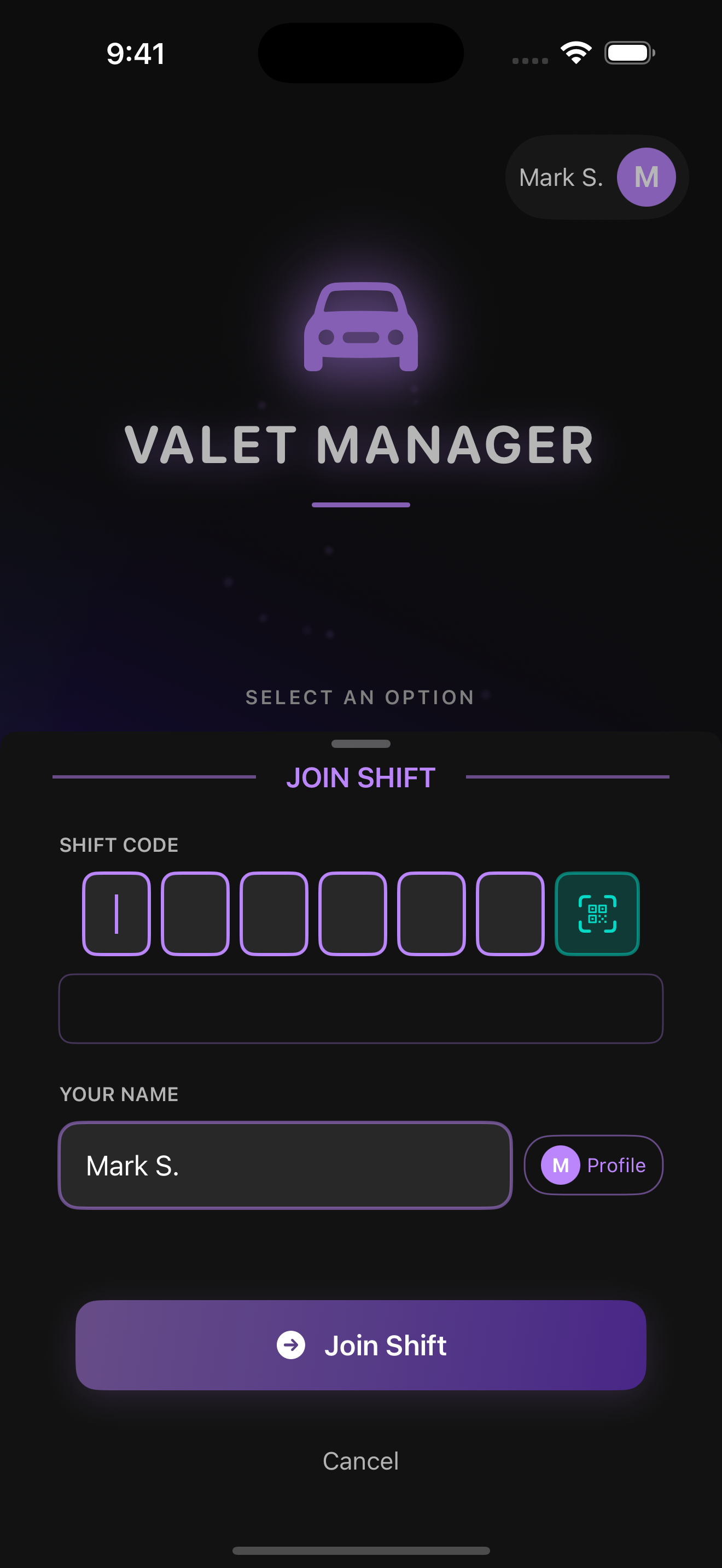
QR Code Team Joining
Solves: Coordination Gaps
New team members join a shift by scanning a QR code. No manual entry, no friction. Everyone sees each other on the team and stays coordinated automatically.
Interface
The screens keep vehicle status visible and make the most common actions easy to reach.
Vehicle entry
Shift overview
Vehicle grid
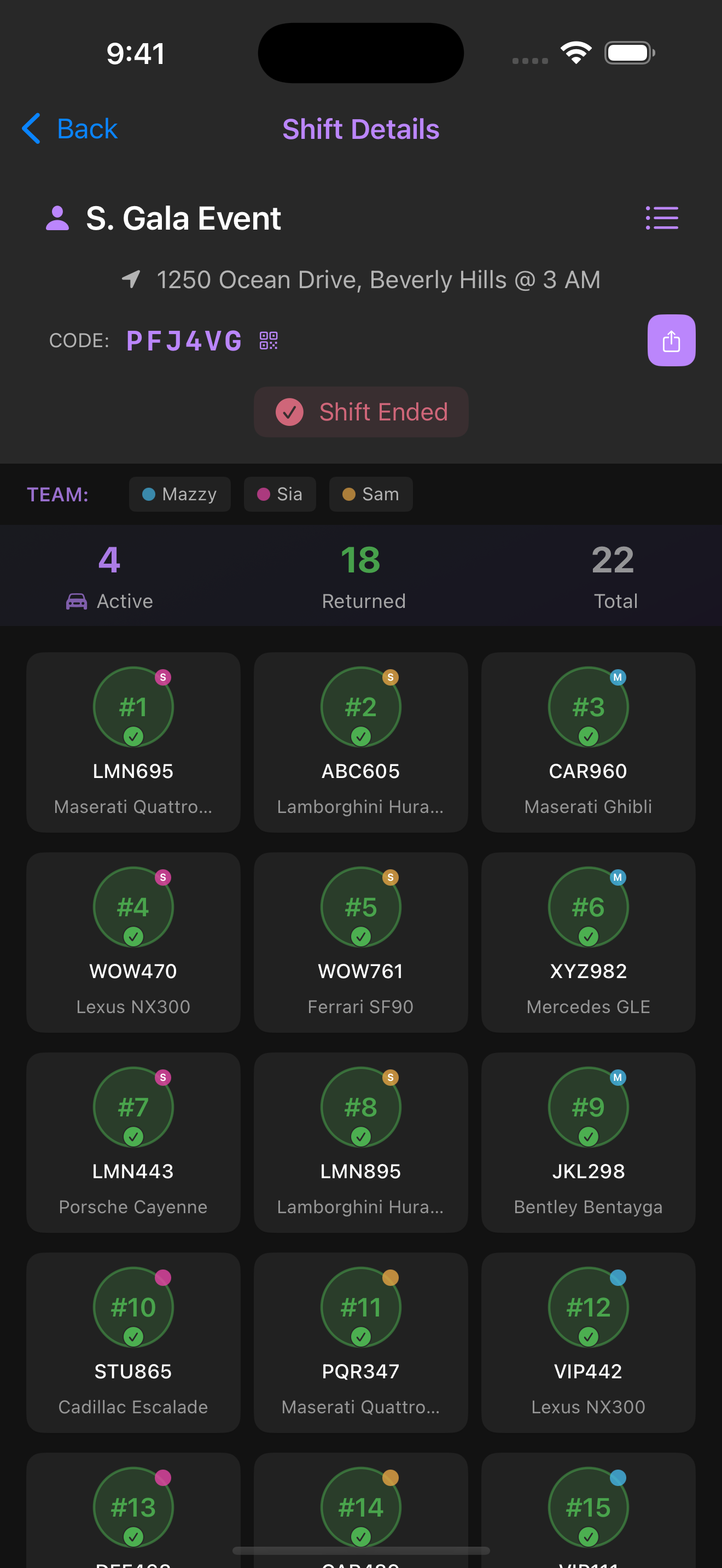
Vehicle status
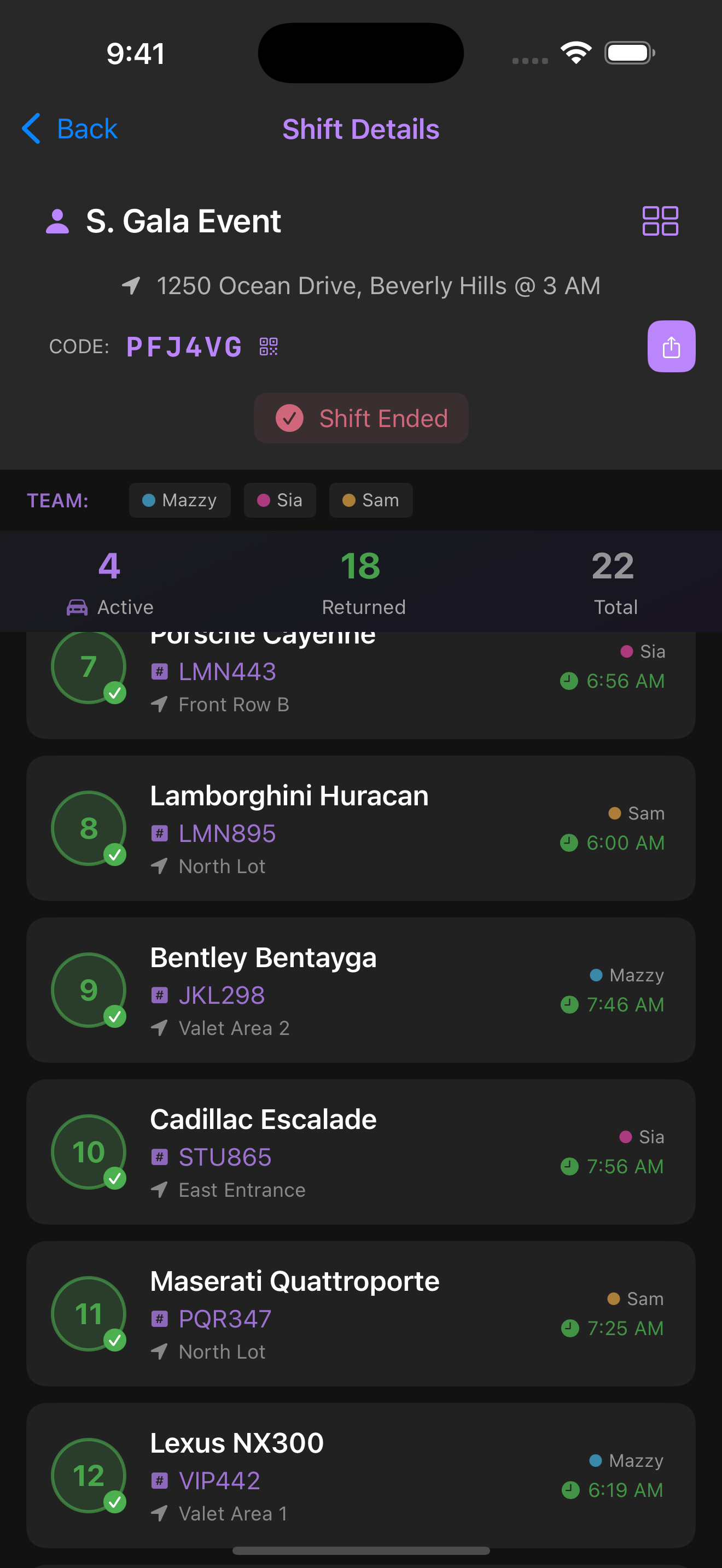
Vehicle details
From fieldwork to prototype
Interaction decisions
Research synthesis and prototyping
I translated field observations into task flows, vehicle states, and handoff scenarios, then used Figma to make an interactive prototype for the core valet workflow.
Scope
This is a hypothetical system design and interactive prototype. It has not been engineered or deployed. The next step would be testing the workflow with other valet teams before making technical decisions.
Methods
System design
To keep the concept grounded, I mapped the information, roles, state changes, and failure cases the service would need to handle.
Shared status model
Every attendant would read and update the same vehicle state. The system would need clear conflict rules and a way to show stale information when connectivity drops.
Vehicle state model
Each vehicle moves through a small set of states, such as checked in, parked, requested, on deck, and returned. Those transitions define the workflow more clearly than individual screens do.
Activity history
Important actions would record who handled a vehicle and when. That history could support handoffs, disputes, and post-shift review.
Connectivity and recovery
Outdoor lots often have poor service. The concept accounts for pending actions, reconnection, and visible confirmation before an update is treated as final.
Roles and shift access
Managers, team leads, and attendants need different levels of access. Joining a shift should be quick without exposing records from another event.
Required information
Vehicle details, timestamps, assignments, photos, and condition notes need clear ownership. The prototype tests which fields are essential during a rush and which can wait.
These are system requirements and design hypotheses, not implemented architecture.
What I learned
Working context
Two years of valet work gave me specific constraints to design around instead of a generic brief.
Shared state
Coordination improves when every attendant sees the same vehicle status and history.
Interruptions
Short flows and visible status matter more than feature depth when people are moving quickly.
Prototype boundaries
The screens can test the workflow, while technical feasibility and adoption by other valet teams remain open questions.