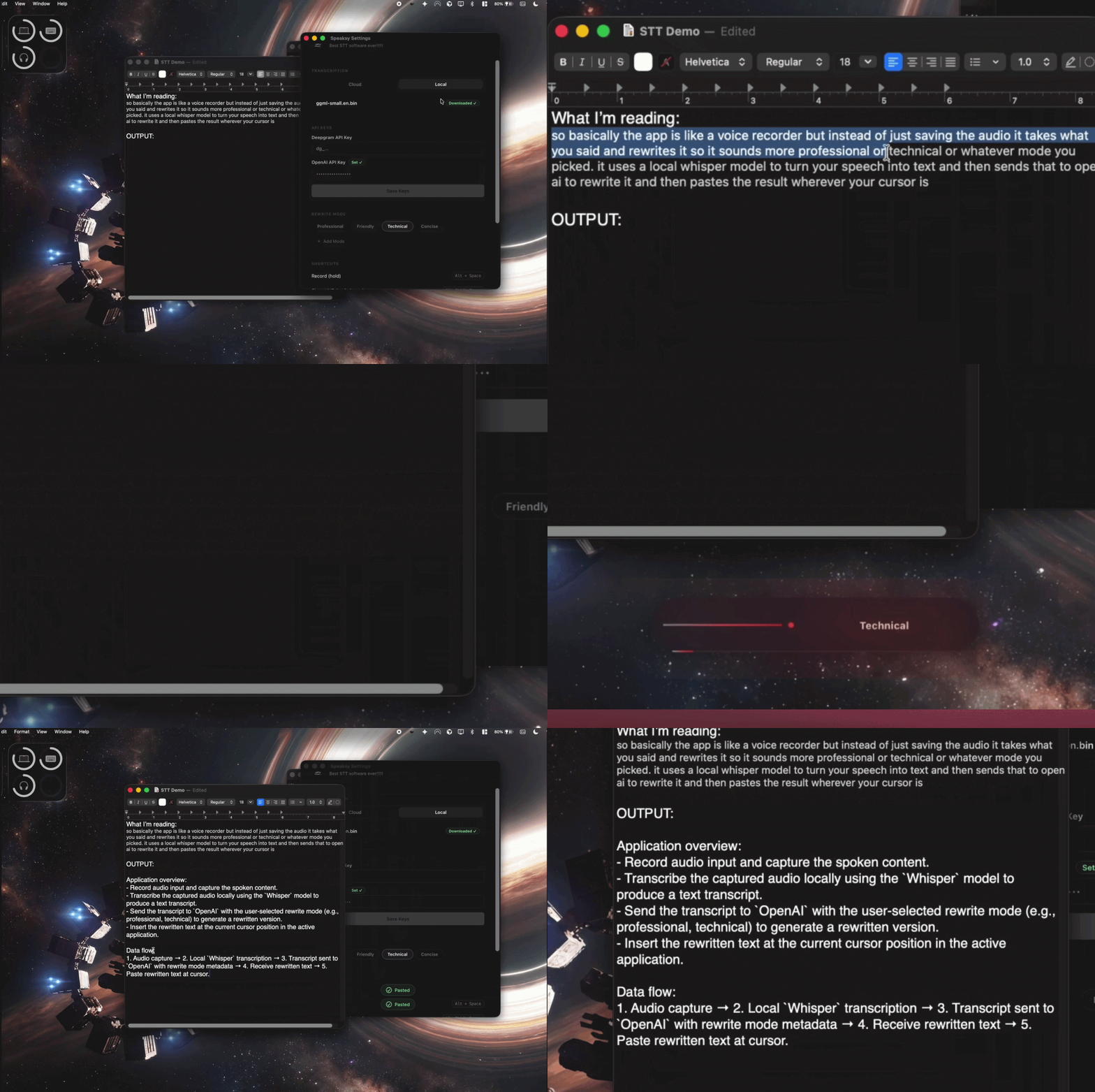
Project Overview
You hit Alt+Space, say what's on your mind, and Speaksy handles everything from there. It captures audio through CPAL, routes it to either Deepgram's streaming WebSocket or a fully local whisper.cpp model running on the Metal GPU, rewrites the transcript with GPT-5 Nano in whatever style you picked, then pastes the result right where you were working with a simulated Cmd+V. A typed Rust async state machine on Tokio keeps each step sequential so nothing fires out of order.
Fully private. Local mode runs whisper.cpp with Apple Silicon Metal acceleration so nothing ever leaves your device. Cloud mode via Deepgram is there when you want lower latency instead. Either way, API keys live in Tauri Stronghold, an AES-256 encrypted vault. They never sit in a plain text file on disk.
How It Works
Every time you hit the hotkey, your voice moves through five stages. A typed Rust state machine keeps things in order so each step waits for the previous one to finish before anything else starts:
Tauri's global shortcut plugin registers Alt+Space system-wide, so it works even when Speaksy isn't the focused app. When you press it, the backend notes which window you were in, flips the state machine to Recording, and shows a small HUD so you know it's listening. Press it again or let the timeout run out and recording stops.
CPAL records audio at your system's default sample rate. As each chunk comes in, the Rust thread computes an RMS amplitude value and sends it to the React frontend as a Tauri event. That's what drives the live waveform bars you see in the HUD. If you cancel early, a Tokio cancellation token cleans up the stream so no audio threads are left hanging around.
A TranscriberFactory picks the right backend based on your settings. Both cloud and local implement the same async trait, so nothing else in the pipeline needs to know or care which one is actually running:
Audio streams over a tokio-tungstenite WebSocket to Deepgram's Nova-2 model. You get partial transcripts as you speak and a final one when the connection closes. Stop early and a cancellation token shuts the WebSocket down cleanly.
Audio gets buffered and handed off to whisper-rs, the Rust bindings for whisper.cpp. On Apple Silicon the whole inference runs on the Metal GPU, so nothing leaves your machine. The model downloads once on first use with a progress bar. After that, startup takes under a second.
The raw transcript goes to the OpenAI Chat Completions API via reqwest. Each mode has its own system prompt. The built-in ones are hand-written, and custom modes build a prompt from whatever goal, audience, and tone you've configured. A governor-based rate limiter keeps you from accidentally burning through your quota. If the API call fails for any reason, you get a toast notification and the raw transcript still lands on your clipboard, so you're never left empty-handed.
arboard writes the rewritten text to your clipboard, then enigo simulates Cmd+V on macOS (or Ctrl+V on other platforms) in the window you had open before pressing the hotkey. No integrations or plugins needed. It just lands. The HUD shows a quick success animation and fades out after five seconds. One thing worth noting: macOS requires accessibility permission for keyboard simulation. Speaksy checks for this at startup and walks you through granting it if you haven't already.
Rewriting Modes
Each mode gives GPT-5 Nano a different set of instructions before it rewrites your transcript. You can see which one is active in the HUD and cycle through them with a shortcut without losing your place.
Examples
Same spoken thought, different mode. Here's what Speaksy produces depending on which rewriting mode is active.
"so basically the app is like a voice recorder but instead of just saving the audio it takes what you said and rewrites it so it sounds more professional or technical or whatever mode you picked. it uses a local whisper model to turn your speech into text and then sends that to open ai to rewrite it and then pastes the result wherever your cursor is"
- Record audio input and capture the spoken content.
- Transcribe the captured audio locally using the
Whispermodel to produce a text transcript. - Send the transcript to
OpenAIwith the user-selected rewrite mode (e.g., professional, technical) to generate a rewritten version. - Insert the rewritten text at the current cursor position in the active application.
- Audio capture
- Local
Whispertranscription - Transcript sent to
OpenAIwith rewrite mode metadata - Receive rewritten text
- Paste rewritten text at cursor
"hey sorry im sick today and i really dont feel like going to the company hangout, its just not gonna happen for me"
Engineering Outcomes
Here are some of the concrete things the architecture decisions actually bought me.
.env file, no plaintext config, and nothing to accidentally commit.Key Design Decisions
Typed State Machine Over Ad-Hoc Flags
The pipeline is modelled as a Rust enum (Idle → Recording → Transcribing → Rewriting → Done). Invalid transitions are caught at compile time, not at runtime. That alone eliminates a whole class of race conditions that tend to sneak into audio pipelines.
Factory Pattern for Pluggable Transcription
TranscriberFactory returns a boxed async trait object based on the user's provider setting. Adding a third backend (like OpenAI Whisper API or Azure Speech) means writing a new struct that implements the trait. The orchestration layer doesn't need to change at all.
Cancellation Tokens for Clean Abort
Every long-running async task (WebSocket streaming, local inference, HTTP calls) holds a Tokio cancellation token. When you abort mid-pipeline, the cancel signal propagates cleanly and prevents resource leaks or dangling threads. For always-on background audio software, that's not optional.
Encrypted Credential Storage
API keys are stored in Tauri Stronghold, a hardware-backed AES-256 encrypted vault. Nothing ever touches the filesystem in plaintext and you don't need to set up any environment variables. It's the same mechanism that underpins password managers.
Real-Time Amplitude Events to React
The Rust audio thread computes per-chunk RMS amplitude and emits it to the frontend via Tauri's event system. React renders waveform bars directly from those events with no polling involved. You get a true real-time visualization of your recording without the audio thread being coupled to the UI lifecycle at all.
Governor Rate Limiter on API Calls
All outbound API calls pass through a governor-based rate limiter using a token bucket algorithm. It prevents accidental quota exhaustion if you fire off requests in rapid succession. When you hit the limit, you get a clear "slow down" notice instead of a cryptic API error.
Tech Stack
| Layer | Technology |
|---|---|
| Desktop Framework | Tauri v2 (Rust backend + Webview frontend) |
| Backend Language | Rust (stable), Tokio async runtime (full feature set) |
| Audio Capture | CPAL 0.15 — cross-platform audio I/O |
| Cloud STT | Deepgram Nova-2 via tokio-tungstenite WebSocket streaming |
| Local STT | whisper-rs 0.14 (whisper.cpp bindings) with Metal GPU acceleration |
| AI Rewriting | OpenAI GPT-5 Nano via reqwest async HTTP (rustls-tls) |
| Output Delivery | arboard (clipboard) + enigo 0.2 (keyboard simulation) |
| Credential Storage | Tauri Stronghold (AES-256 encrypted vault) |
| Rate Limiting | governor 0.6 (token bucket algorithm) |
| Frontend | React 19, TypeScript, Zustand 5 (state management) |
| IPC | Tauri typed commands & events (frontend ↔ backend) |
Project Structure
speaksy/
├── src/                            # React + TypeScript frontend
│   ├── app/                        # Root component, routing
│   ├── components/
│   │   ├── hud/                    # RecordingHud, WaveformBars
│   │   └── settings/               # SettingsPage, provider config, custom modes
│   ├── ipc/                        # Tauri command wrappers & event listeners
│   └── store/                      # Zustand global state
│
└── src-tauri/
    ├── Cargo.toml                  # Rust deps: tokio, cpal, whisper-rs, enigo...
    └── src/
        ├── app/                    # Hotkey handler, tray menu, window management
        ├── core/
        │   ├── state_machine.rs    # RuntimeState enum + transition logic
        │   └── retry.rs            # Exponential backoff helper
        ├── services/
        │   ├── audio.rs            # CPAL capture + amplitude computation
        │   ├── transcription/
        │   │   ├── factory.rs      # TranscriberFactory (cloud / local selector)
        │   │   ├── deepgram.rs     # WebSocket streaming client
        │   │   └── local.rs        # whisper-rs inference + Metal GPU config
        │   ├── rewriting.rs        # OpenAI GPT-5 Nano integration
        │   ├── output.rs           # Clipboard write + enigo paste simulation
        │   ├── rate_limiter.rs     # Governor token-bucket wrapper
        │   └── storage.rs          # Tauri Stronghold key management
        ├── prompts/                # System prompt templates per mode
        └── tests/                  # Unit tests: state machine, storage, amplitude
App Startup Flow
When Speaksy launches, a few things need to set up before you can start recording:
Tauri Plugin Registration
The Stronghold, global-shortcut, and clipboard-manager plugins are registered in the Tauri builder, and the global Alt+Space hotkey gets bound system-wide.
Credential & Config Load
API keys are pulled from Stronghold, and the active transcription provider and rewriting mode are loaded from your saved settings. If any required keys are missing, the Settings UI will prompt you to add them before you can start.
Local Model Check (if enabled)
If you've chosen local transcription, the app checks that the whisper.cpp model file is on disk. If it's not there yet, a download prompt appears with a real-time progress bar. Once it's downloaded, whisper-rs initializes with Metal GPU context, which typically takes under a second on Apple Silicon.
Accessibility Permission Check
macOS requires explicit accessibility permission for keyboard simulation. The app checks this at startup and opens System Preferences to the right pane if you haven't granted it yet. Without it, the paste step quietly falls back to clipboard-only instead.
Source Code
The full source is on GitHub: Rust backend services, React frontend components, the Tauri IPC layer, and all the prompt templates.
View on GitHub